If you're wondering how to find an AirTag tracking you, the fastest path is to combine your phone's built-in tracker alert with a quick Bluetooth scan — then narrow it down by sound and a physical search. Here's the full five-step check, and what to do once you've found it.
Maybe your iPhone flashed a message: "AirTag Found Moving With You." Maybe an Android alert mentioned an unknown tracker. Or maybe nothing pinged at all and you just have a feeling. Any of those is reason enough to check.
AirTags are cheap, tiny, and last about a year on one battery — which is exactly what makes them useful for stalking as well as for finding keys. The good news: both iPhone and Android now detect unwanted trackers, and you can find a hidden one with the phone in your pocket.
Why AirTag tracking is hard to notice
An AirTag has no GPS and no camera. It's a small disc that broadcasts a secure Bluetooth signal, which any nearby Apple device relays to its owner through the Find My network. That's why a tracker the size of a coin can report your location from across a city.
It also means a hidden AirTag gives almost no outward sign — no light, no obvious sound unless it's been separated from its owner for hours. You have to look for the Bluetooth signal, not the device.
How to find an AirTag tracking you: 5 steps
Run these in order. The first two take under a minute; the rest narrow down the exact location.
Step 1 — Check for an automatic tracker alert
Both major phones now watch for unwanted trackers automatically:
- iPhone (iOS 14.5+): you'll get an "AirTag Found Moving With You" alert if an unknown AirTag travels with you over time. Tap it for details.
- Android (6.0+): open Settings → Safety & emergency → Unknown tracker alerts to run a manual scan, or install Apple's free Tracker Detect app.
These alerts are the easiest signal, but they're not instant — they can take hours to trigger, and a determined stalker can use trackers designed to dodge them. So don't stop at step 1.
Step 2 — Run a Bluetooth scan
An AirTag is a Bluetooth Low Energy (BLE) device, so a BLE scanner can surface it directly. Open a scanner, list the nearby devices, and watch the signal strength.
The trick: walk around. A tracker that's actually on you (in your bag, your car, your coat) stays at a steady or rising signal as you move, while devices fixed to a room fade. The one that follows you is the one to find.
Bluewex's AirTag & Bluetooth scanner → shows every nearby device with live signal strength, so you can literally walk the signal to its source.
Bluewex scans for AirTags and trackers in one tap. Download free →
Step 3 — Make it play a sound
Once your phone identifies a tracker, you can usually make it play a sound to find it. And an AirTag that's been separated from its owner for a while will start chiming on its own when it's moved.
Use the sound like a game of hot-and-cold. If the AirTag's speaker has been disabled — a known trick — fall back to the Bluetooth signal strength from step 2.
Step 4 — Search the common hiding spots
If you know it's near but can't see it, check the places trackers are actually planted.
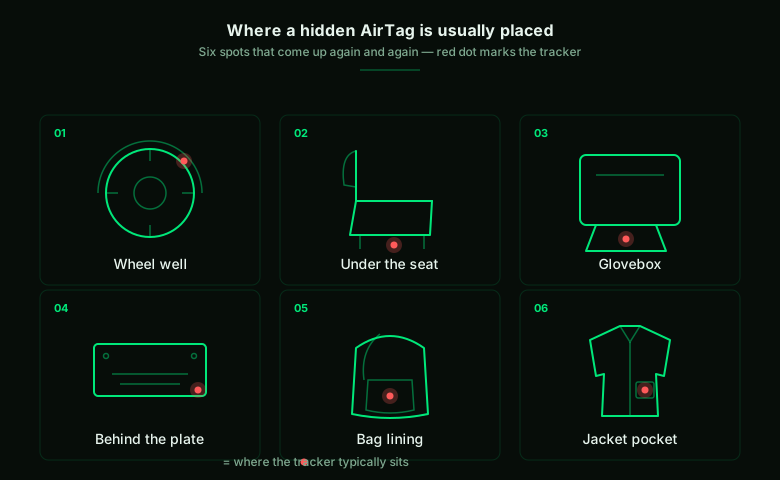
In a car: wheel wells, under the seats, inside the glovebox, behind the license plate, and in the trunk lining or spare-tire well.
On you: bag and purse linings and pockets, jacket and coat pockets, and the seams or wheels of a suitcase.
Step 5 — Identify it and decide your next step
When you find it, hold the AirTag flat against the top of your phone. Any NFC-capable phone will read it and open a page showing the tracker's serial number — and, if the owner marked it lost, some contact details.
Important: if you believe someone is using it to follow you, don't just pull the battery and move on. Disabling it tells the stalker you found it and destroys a lead. Instead, keep the serial number and contact the police — they can ask Apple to identify the registered owner.
To disable it when you're ready, twist the back counter-clockwise and remove the battery.
AirTags aren't the only thing to scan for
The same Bluetooth scan that finds an AirTag also surfaces BLE cameras and other trackers. If you're checking a rental or hotel room, it's worth running the full sweep — see our guide on how to detect hidden cameras, which covers WiFi, Bluetooth, magnetic and visual checks together.
A note on safety
If a tracker turns up and you have any reason to fear the person who placed it, your safety comes first. Don't confront them, and consider moving to a safe, public place before you investigate further. In the US, the National Domestic Violence Hotline (1-800-799-7233) can help; other countries have equivalent services. A tracker can be evidence — police and these services can advise on the safest way to handle it.
Frequently asked questions
How do I know if someone is tracking me with an AirTag?
The clearest signs are an automatic alert ("AirTag Found Moving With You" on iPhone, or an unknown tracker alert on Android) and a Bluetooth device whose signal stays strong as you move between locations. A separated AirTag may also chime on its own when moved.
Can Android phones detect AirTags?
Yes. Android 6.0 and later includes unknown tracker alerts in Settings, and Apple offers a free Tracker Detect app for manual scans. A third-party Bluetooth scanner works on both platforms.
Will an AirTag make a sound if it's tracking me?
An AirTag that has been away from its owner for a period will play a sound when it's moved — but the window varies, and the speaker can be physically disabled. Don't rely on sound alone; use a Bluetooth scan as well.
Where do people hide AirTags in a car?
The most common spots are wheel wells, under the seats, inside the glovebox, behind the license plate, and in the trunk lining or spare-tire well. Search those first.
What should I do if I find an AirTag tracking me?
If you feel unsafe, don't disable it silently — keep the serial number (read it by tapping the AirTag to your phone over NFC) and contact the police, who can ask Apple to identify the owner. Move to a safe place first if you have any concern for your safety.
How do I scan for AirTags near me?
Open a Bluetooth Low Energy scanner and list the nearby devices — a tracker shows up as a BLE broadcaster you don't recognise. Walk a few steps and watch the signal strength: the device that stays strong as you move is the one travelling with you. Bluewex's AirTag scanner shows every nearby tag with live signal, so you can scan for AirTags near you in one tap.
Can you track an AirTag anywhere?
An AirTag has no GPS of its own. It relays its location through nearby Apple devices on the Find My network, so its position only updates when an iPhone or iPad happens to be in Bluetooth range. In a busy city that's almost constant; in an empty area it can go dark for a while.
How do I make an AirTag discoverable to read its details?
Hold the top of your phone against the white side of the AirTag. An NFC-capable phone reads it and opens a page with the tracker's serial number — and, if the owner put it in Lost Mode, a contact number. This works from any iPhone or modern Android, no app required.
The bottom line
A hidden AirTag is designed to be invisible, but it can't hide its Bluetooth signal. Between your phone's tracker alerts, a quick BLE scan, the sound, and a check of the usual hiding spots, you can find one in a few minutes — and a tracker you can find is a tracker you can stop.
If you want help with the scan, that's exactly what Bluewex does — free on iOS and Android.
Stay safe.
Related guides: How to Detect Hidden Cameras: 10 Ways · AirTag & Bluetooth Scanner · Full Airbnb Safety Scan